TL;DR
- An airport holiday travel plan works best when it’s built from last year’s zone-by-zone patterns at checkpoints, concourses and gate areas, aligned by weekday rather than calendar date.
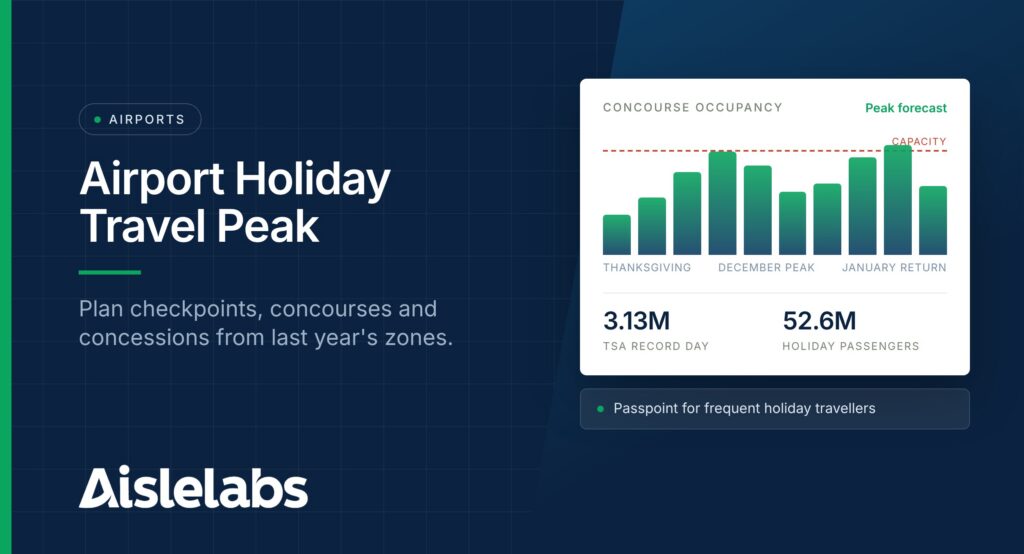
- TSA screened 3,133,924 people on Sunday, November 30, 2025, the busiest day in its history, and Airlines for America forecast a record 52.6 million passengers for December 19, 2025 to January 5, 2026.
- Aislelabs Flow AI measures detectable devices through an airport’s existing access points, so operations teams can see occupancy trends, dwell time and peak hours by zone without asking passengers to sign in.
- Dwell time in concourses tells concessions when travellers have time to spend, which is the input staffing and stock plans need most.
- Passpoint, supported by Aislelabs Connect, lets returning holiday travellers reconnect automatically for up to 365 days instead of the usual 14.
- Portal surveys and sponsorship placements during peak weeks give airport commercial teams fresh feedback and inventory at the moment terminals are fullest.
If you’re planning for the airport holiday travel peak, you already know the stretch from Thanksgiving to New Year’s Day brings your busiest days, your longest lines and the least room for error. What makes it hard is that security, operations and concessions all plan for the same days from different numbers, while pressure points move hour by hour between checkpoints, concourses and baggage claim. The encouraging part is that your WiFi network already records much of what you need. In this guide, you’ll find a readiness plan for peak days: how to map checkpoint and concourse occupancy, use dwell time for concession staffing, set up Passpoint for frequent travellers, and run surveys and sponsorships during the rush.
Why the 2026 Holiday Peak Needs a Data Plan
Holiday air travel in North America keeps setting records, so plans based on last year’s averages will understate this year’s peaks. TSA screened 3,133,924 individuals on Sunday, November 30, 2025, the highest number in the agency’s history.
Airlines for America forecast a record 31 million passengers for November 21 to December 1, 2025, with the Sunday and Monday after Thanksgiving expected to be busiest. For the winter holidays, A4A projected a record 52.6 million passengers from December 19, 2025 to January 5, 2026, about 2.9 million a day, with December 19, 20, 21, 26 and 28 as the busiest days (A4A, December 2025).
In Canada, Statistics Canada reported that 4.9 million passengers were screened at the eight largest airports in December 2025, up 0.6% from December 2024, using CATSA data (Statistics Canada, February 2026). International traffic rose 8.7% while transborder traffic fell 12.5%, a reminder that the mix of travellers can shift even when totals look flat.
For 2026, US Thanksgiving falls on November 26, so the comparable Sunday is November 29, and Christmas lands on a Friday.
Step 1: Map Last Year’s Peaks by Zone and Hour
The first step in any airport holiday readiness plan is a zone-by-hour view of last year’s peak days, aligned to this year’s calendar. Aislelabs Flow AI measures detectable devices through the access points you already run, so you can pull footfall and occupancy trends for checkpoints, concourses, food courts, gate holdrooms and baggage claim.
Align by weekday and holiday position, not date. Compare the Sunday after Thanksgiving 2025 (November 30) with the Sunday after Thanksgiving 2026 (November 29). Compare the Friday before Christmas with the Friday before Christmas.
Two cautions. WiFi analytics measures detectable devices, not every passenger, so it shows trends and relative peaks rather than an exact count; your screening and airline numbers remain the official totals. And zones need coverage: a checkpoint queue area without access points nearby can’t be measured well.
Step 2: Watch Checkpoint and Concourse Occupancy
Occupancy and capacity trends show where pressure is building inside the terminal before it turns into a crowding problem. Flow AI’s occupancy view and peak-hour prediction help duty managers see which concourse filled up the fastest and whether post-security space can absorb the next wave the following day.
Use it for three decisions:
- Queue overflow. If the zone in front of one checkpoint runs far above its usual level while another sits quieter, wayfinding staff and digital signs can redirect passengers.
- Recovery after disruptions. Occupancy trends show which areas need extra staff and supplies as storm delays stack up.
Our post on stadium and venue occupancy reporting explains the occupancy features in more detail.
Step 3: Use Dwell Time to Staff Concessions
Dwell time in post-security zones is the most useful input for concession staffing, because time to spend predicts spending better than passenger volume alone. A packed concourse where travellers rush to gates is a different staffing problem from a busy concourse where flights are delayed and people wait.
Share last year’s dwell by concourse and hour with concessionaires so they can schedule staff, prep and deliveries for the windows when travellers lingered.
Journey mapping and zone transitions show which food and retail zones passengers pass through on the way to gates, and heatmaps show where crowds gather. Our post on how airport commercial teams use WiFi analytics covers the year-round revenue side; this playbook is about getting the peak weeks right.
From our work with airports: A major US airport we work with used WiFi-based location analytics on its existing network to see which connecting routes between concourses passengers used most, then shared the findings across operations, concessions and capital planning teams.
Step 4: Set Up Passpoint for Frequent Holiday Travellers
Passpoint lets returning travellers connect to your WiFi automatically and securely, without seeing the portal again on every trip. Aislelabs Connect supports Hotspot 2.0 and Passpoint, extending access from 14 days to up to 365 days, which suits travellers who fly home for Thanksgiving and again for Christmas.
Set it up before November so Thanksgiving travellers reconnect without friction in December, when a passenger rebooking a cancelled flight needs a connection immediately. Our post on what Hotspot 2.0 really solves and what it doesn’t covers the limits honestly.
Step 5: Run a Short Portal Survey During the Peak
A one-question survey on the WiFi portal during peak weeks gives you passenger feedback at the moment experience matters most. Connect’s native portal surveys appear in the sign-in flow on a fully branded captive portal, so you hear from people while they’re still in the terminal.
Good holiday questions include:
- “How long did security take today?” with simple ranges.
- “What brought you to the airport this early?”
- “Did you find a place to eat near your gate?”
Rotate one or two questions across the season. Our guide to airport WiFi survey questions has a fuller question bank.
Step 6: Sell Holiday Sponsorship Placements
Holiday peaks are when portal sponsorship inventory reaches the most travellers, so plan placements before November. Connect’s sponsorship placements with dynamic ad content can feature terminal retailers, duty free gift offers, lounge day passes or a local tourism partner welcoming visitors home for the holidays.
Time placements to the days that matter: gift offers before Christmas, ground transport partners on the Sunday after Thanksgiving. Our post on generating revenue from sponsored guest WiFi covers pricing models.
Consent still matters at the busiest times. Connect supports GDPR, CASL and CCPA compliant consent capture, and Aislelabs Marketing runs on the guest records Aislelabs Connect captures at the portal, so any follow-up email goes only to travellers who opted in.
A Holiday Readiness Timeline
The readiness plan works best as a short sequence, so each team has its inputs before the first peak:
| When | Operations | Commercial and guest experience |
| Early November | Build the zone-by-hour peak calendar | Load sponsorship placements and holiday portal content |
| Mid November | Share dwell patterns with concessionaires | Turn on Passpoint and the first survey question |
| Thanksgiving week | Watch live occupancy against the plan | Rotate survey questions and placements |
| December 18 to January 4 | Watch weather days and recovery | Review survey results weekly |
| January | Compare peaks with last year and document lessons | Report sponsor results and plan next year |
Aislelabs for Airports
Aislelabs has three separate products, sold standalone or together, and airports often use all three. The Aislelabs products page compares them.
- Aislelabs Flow AI measures footfall, dwell by zone and terminal, heatmaps, journey mapping, peak-hour prediction, live occupancy and multi-location benchmarking across terminals from existing access points, with no passenger sign-in.
- Aislelabs Connect runs a branded portal with multiple authentication methods, Hotspot 2.0 and Passpoint, sponsorship placements, native surveys and consent capture.
- Aislelabs Marketing sends visit-triggered email and SMS to opted-in travellers, with campaign reporting.
Flow runs independently of Connect and Marketing. Aislelabs works with multiple WiFi hardware vendors, needs no new hardware, and is ISO 27001:2022 certified, as outlined on our security page.
Request a demo to explore how Aislelabs can transform your business with WiFi marketing and analytics.
FAQs About Airport Holiday Travel Peaks
The busiest TSA day on record was Sunday, November 30, 2025, with 3,133,924 people screened. A4A expected December 19, 20, 21, 26 and 28 to be the busiest days of the winter holiday period.
Airports can use WiFi data to see occupancy, dwell time and peak hours by zone, then plan staffing, wayfinding and concessions around them. Aislelabs Flow AI does this from existing access points without sign-in.
Passpoint lets returning travellers reconnect automatically and securely. With Aislelabs Connect, access can extend from 14 days to up to 365 days.
Airports should ask one or two short questions about security wait, food options or arrival time, and rotate them through the season.
Airports should start in early November at the latest, so peak calendars, Passpoint and sponsorships are ready before Thanksgiving week.